EN

Cybersecurity Suite

XMfortress Detect

Security monitoring for SOC teams. In real time.

See what is actually happening on the network.

Many fine signal streams converge into a single bundled violet beam.

XMfortress Detect is the monitoring layer of the Cybersecurity Suite. SOC teams and IT leads receive a live view of what is actually happening across the organization: deduplicated, prioritized, and presented in language that leadership can read.

What it changes

01

Incidents, not events

Triage time drops by orders of magnitude. Analysts work on incidents, not on log lines.

02

One truth for everyone

Leadership and SOC work on the same data basis. Discrepancies between reporting layers disappear.

03

No rule babysitting

AI-driven correlation drastically reduces the maintenance overhead of classic correlation rule sets.

04

Audit-grade history

Every action in XMfortress Detect is documented traceably, ideal for ISO 27001, NIS2, and DORA.

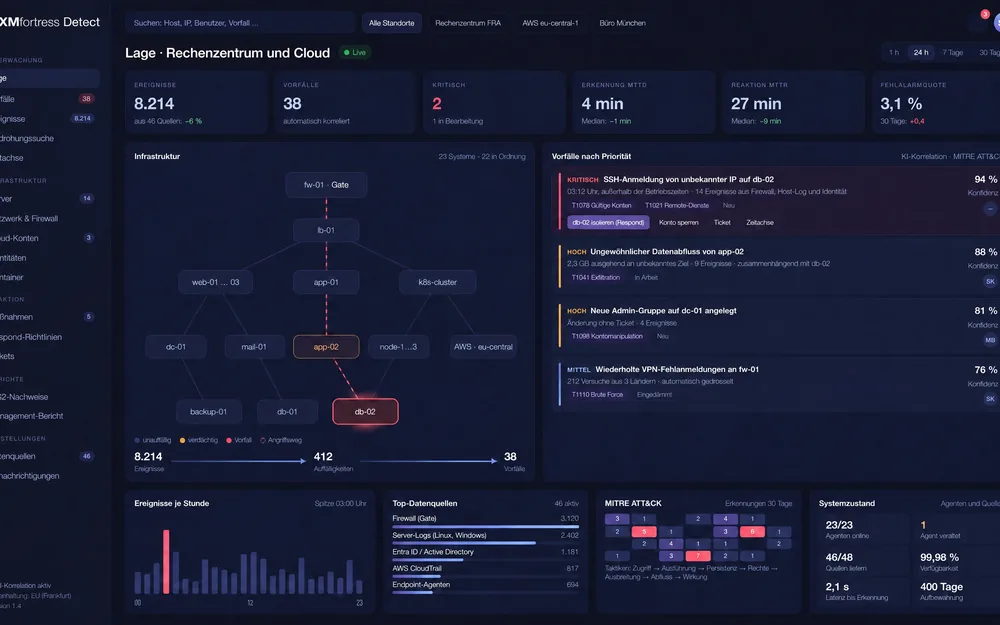
The XMfortress Detect situation view: infrastructure with attack path, incidents by priority with confidence and next step, data sources and MITRE ATT&CK.
8,214 events become 38 incidents.

HOW IT WORKS

The XMfortress Detect approach

XMfortress Detect consolidates signals from all relevant sources, automatically compresses them to incidents, and delivers the context required for fast decisions.

01

Signals from one place

XMfortress Detect reads firewall logs (particularly from XMfortress Gate), endpoint telemetry, identity provider events, cloud audit logs, and application telemetry. Data arrives in standardized formats and is normalized before correlation starts.

02

AI correlation instead of rule maintenance

Instead of a sprawling rule set that needs constant adjustment, XMfortress Detect relies on trained correlation models. Related events are automatically grouped into one incident. An ongoing brute-force attempt across 200 endpoints appears as a single incident, not 200 separate alerts.

03

Prioritization with context

Every incident carries a severity, a confidence score, and a suggested next step. Analysts see why an incident was rated high priority and can review the reasoning in plain language.

04

Two views, one truth

XMfortress Detect provides a technical SOC view for analysts and a consolidated situational view for leadership. Both work on the same data, so there is no discrepancy between technical reporting and management metrics.


METRICS

What XMfortress Detect measures

The following measures are available from day one.

MetricDescription
Active events Number of raw security events in the observation window
Correlated incidents Number of incidents formed by AI correlation
High-priority incidents Incidents with severity high or critical
Mean time to detect Average time from first activity to detection
Mean time to respond Average time from detection to documented response
False-positive rate Share of incidents closed as unfounded

In comparison

XMfortress Detect sits between classic SIEM platforms and pure endpoint detection tools.

Aspect Classic SIEM Endpoint Detection XMfortress Detect
Data sources Broad, raw Endpoint-focused Broad, normalized
Correlation Rule-based Endpoint heuristics AI models
Maintenance effort High Medium Low
SOC size Large team Variable 2 to 10 people
C-level reporting Rarely integrated Rarely Integrated

Typical deployments

Three example scenarios

Example scenarios of typical deployments in the European mid-market and the public sector.

01

A three-person team, five sites

A mid-sized construction company with five sites and 320 employees runs its security monitoring with a three-person team. Before XMfortress Detect, around 8,000 daily events sat in the triage queue, requiring manual review. With Detect, that drops to roughly 40 prioritized incidents per day. Depth of analysis per incident increases substantially, and mean time to detect halves within the first three months.

02

MSSP platform with 60 tenants

A German managed security service provider serves 60 mid-market clients through a central XMfortress Detect platform. Tenant separation, tenant-specific prioritization logic, and a consolidated dashboard for SOC shifts allow the provider to operate with eight analysts across day and night shifts.

03

Incident report for the supervisory authority

An energy provider uses XMfortress Detect to compile a complete incident report for the supervisory authority after an attempted intrusion. The precise time reconstruction, the chain of correlated signals, and the measures taken are exported directly from the platform without special effort.

NEXT STEP

From alert noise to situational awareness

XMfortress Detect changes the economics of security monitoring. Where large teams were necessary before, a focused core team with a platform that handles correlation and prioritization now suffices. Where reporting to leadership had to be assembled with effort, a consolidated situational picture emerges as a by-product of daily work.

XMfortress Detect is not a replacement for a SOC. Detect is the platform on which a modern, mid-sized European SOC can realistically be operated today.

Get to know XMfortress Detect

We will walk you through XMfortress Detect in a personal conversation and answer your questions about deployment and next steps.

More products in the suite

Sightadel

NIS2, DORA, ISO 27001 and GDPR as preconfigured control catalogues, plus a security score from 0 to 100 across six domains. Dat…

View

XMfortress Respond

Detects, isolates and redirects to honeypots in seconds, within a policy your organisation defines. Every action reversible and…

View

XMfortress Gate

Four graded models secure the perimeter and internal zones, from a single practice to a corporate network, with one management …

View

veyrisk

Vulnerabilities, attack surface, web applications, cloud and identities ranked by real risk. Active scans only with proof of ow…

View

Contact

Reputation takes years. Destruction takes seconds.

Talk to us before somebody else does. The first conversation is free and we reply the same business day.